
Photoshop Exposes Optical Illusion

One of these optical illusions came across my desk again…
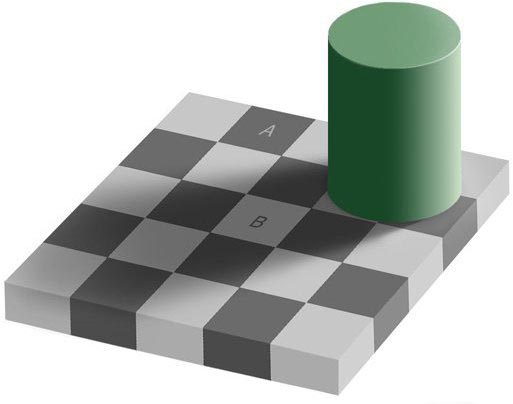
optical illusion

which claims that the fields marked A and B have the same gray level. Just looking at the image it is obvious that this could not possibly be. So, normally, the untrained non-scientific mind would push it aside, maybe say, wow, really?! and wander on.

But this is where I came in – a trained scientist! And this scientist now really had enough of this and went on the quest to look for himself.

I started up trusty photoshop, zoomed into an area that contained both the fields A and B, cut a bit out of field A and dragged it next to field B …
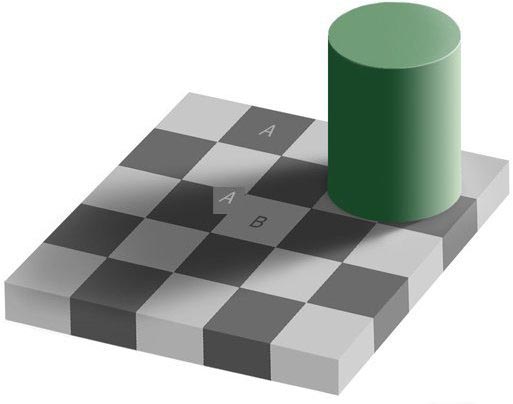
optical illusion demonstrated

And what do you know? When the cut out little square from A is right next to field B, it is very clear that they are the same shade of gray – quod erat demimonstrum!

And we still trust our eyes? A little shadow so that the eye ‘thinks’ that the field must be brighter, makes it brighter for the eye. Could not help contemplating how many things there are that I don’t see and how many things I see that are not there.

UPDATE:

I was really surprised that there was so much discussion about this relatively irrelevant subject, but it went even further than somebody even accusing me of cheating. Somebody made a life-action demonstration this this little optical illusion and I just have to share this here:

[youtube]http://www.youtube.com/watch?v=z9Sen1HTu5o[/youtube]

17 thoughts on “Photoshop Exposes Optical Illusion

  1. ashley

    are you sure that it wasnt saying the LETTER a and the LETTER b are the same shade of gray

  2. Liono

    hhahahahaha i think thats exactly right ashley – HHAHAHAHAH shut down in one sentence author..feel gooooooooooooooood?

  3. Chuck

    Sorry folks but look closely . . . .
    The little, lower right corner that came from the square A cut out is lighter. Also why is the square next to B not the same as the piece from A?
    Call me . . . I have a bridge you might be interested in.

  4. Merlin

    wow – I had not expected any comments on THAT post – this is so irrelevant – and yes, I really just cut out a square in photoshop and moved it – did not try to trick anybody – if you think of conspiracy then just try it yourself – it’s easy enough – and yes, this little (seemingly) white corner is really the medium gray from two fields above – but again – if it’s that important for you – just try it yourself. Then do something important and think about something like supporting our troops

  5. steve

    just tried it in photoshop using the eyedropper tool on the a b squares and other squares as well…a and b match…i need to review this further

  6. its true

    no this is true i got it on paint took out a square out of all the light spaces tht wer grey and put it onto the white space with the shadow onto it it works

Leave a Reply

Your email address will not be published. Required fields are marked *

This site uses Akismet to reduce spam. Learn how your comment data is processed.