Feb
8
Photoshop Exposes Optical Illusion
Filed Under Science | 21 Comments
One of these optical illusions came across my desk again…
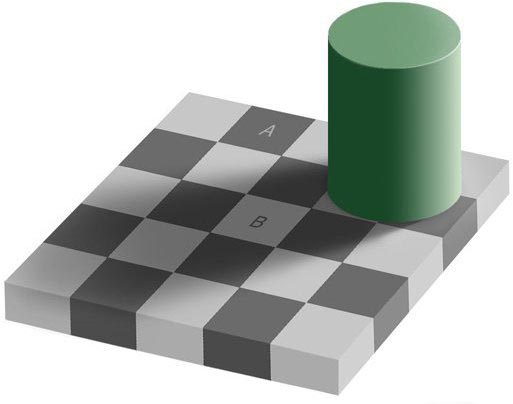
which claims that the fields marked A and B have the same gray level. Just looking at the image it is obvious that this could not possibly be. So, normally, the untrained non-scientific mind would push it aside, maybe say, wow, really?! and wander on.
But this is where I came in – a trained scientist! And this scientist now really had enough of this and went on the quest to look for himself.
I started up trusty photoshop, zoomed into an area that contained both the fields A and B, cut a bit out of field A and dragged it next to field B …
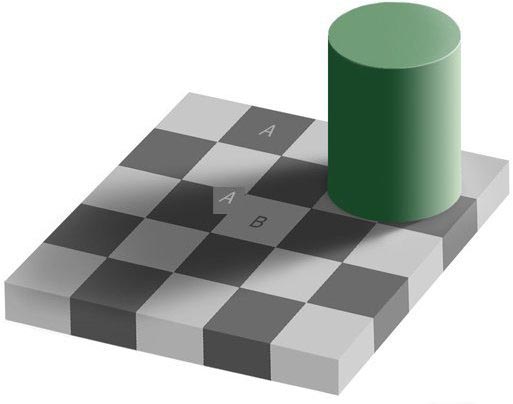
And what do you know? When the cut out little square from A is right next to field B, it is very clear that they are the same shade of gray – quod erat demimonstrum!
And we still trust our eyes? A little shadow so that the eye ‘thinks’ that the field must be brighter, makes it brighter for the eye. Could not help contemplating how many things there are that I don’t see and how many things I see that are not there.
No related posts.
Posted by Merlin Silk - February 8th, 2008


are you sure that it wasnt saying the LETTER a and the LETTER b are the same shade of gray
hhahahahaha i think thats exactly right ashley – HHAHAHAHAH shut down in one sentence author..feel gooooooooooooooood?
That is cool! I did the same thing… and what do you know? It was right!
that ia really crazy! i couldn’t believe it!!!
Sorry folks but look closely . . . .
The little, lower right corner that came from the square A cut out is lighter. Also why is the square next to B not the same as the piece from A?
Call me . . . I have a bridge you might be interested in.
wow – I had not expected any comments on THAT post – this is so irrelevant – and yes, I really just cut out a square in photoshop and moved it – did not try to trick anybody – if you think of conspiracy then just try it yourself – it’s easy enough – and yes, this little (seemingly) white corner is really the medium gray from two fields above – but again – if it’s that important for you – just try it yourself. Then do something important and think about something like supporting our troops
i tried it and its true. I was sosurprised
Wow!
When i do that it doesnt come out the same
oh i did it wrong, it is the same shade..
omg dat is rlle weird lol it cant be right
wtf? this is retarted
of course the square next to B is the same w/ A, but because of the shade the color changes(RGB).
just tried it in photoshop using the eyedropper tool on the a b squares and other squares as well…a and b match…i need to review this further
Haha yeah for all you people that say it doesn’t work… try it yourself!
no this is true i got it on paint took out a square out of all the light spaces tht wer grey and put it onto the white space with the shadow onto it it works
its all about the shadow of the green cylinder.
aswq, I agree with you 100%
All of you are the biggest retards in the world. Seriously, a bunch of retarded morons. You were tricked into thinking you were even bigger retards. Stupid retards!
You don’t have to cut the square out and move it, the color picker tools tells you exactly the colors used in each box.
Color picker and a thick line drawn to connect them. Paint the line another color (e.g. blue) using color-fill to prove the exact match. Watch squares A and B (and their lower-left diagonal neighbor squares as well) all turn blue b/c they match exactly! Unlike Microsoft Paint, KolourPaint in Linux KDE package allows color-fill on similar colors, not just exact match. So anyone using KolourPaint, check the color toolbar and be sure the “fill cube” to the right reads “exact match”. Watch the magic in all its glory!
First Look at the Darker squares Adjacent to square A.
Notice how they are the same color.
The square adjacent to square A, which is positioned on the right hand side, and south of A is partially illuminated, and partially in the shadow.
We can clearly see that this square is exactly the same color as square A. Please remember that this is the square adjacent to square A, which is partially in the shadow.
Square B appears lighter then both square A, and the square adjacent to square A which is the same color as square A and partially illuminated, and partially shadowed.
If square B and square A are indeed the same color, then why is the square adjacent to square A which is also linearly above B:
1) the same color as square A in the illuminated portion
2) NOT THE SAME COLOR AS B IN THE SHADOWED PORTION
Answer:
It’s pretty simple to understand. If this had been a real object, square A, and square B are exactly as your brain had perceived it.
They are in fact two different colors.
Square B APPEARS to be as dark as square A because of the variation in luminosity.
Your brain is not fooled by this, but I content that your eyes may be. Fortunate we have a BRAIN to instantly realize what it is the eye is seeing in this picture.
Photoshop does not have a brain.
If you create this model in tangible reality; and measure the frequency of light emitted from each square. Square A and B will indeed be different colors.